(1).png "B2B eCommerce with nopCommerce: Enterprise-Ready Features (and how to use them)")
Quick Answer
nopCommerce is enterprise-ready for B2B when you use customer roles and ACL permissions to control who sees what, apply tier/role-based pricing for wholesale logic, run multiple storefronts from one installation, and integrate with back-office systems (ERP/CRM/PIM). Add proper caching, hosting, and monitoring, and you get a scalable B2B channel that can grow without replatforming.
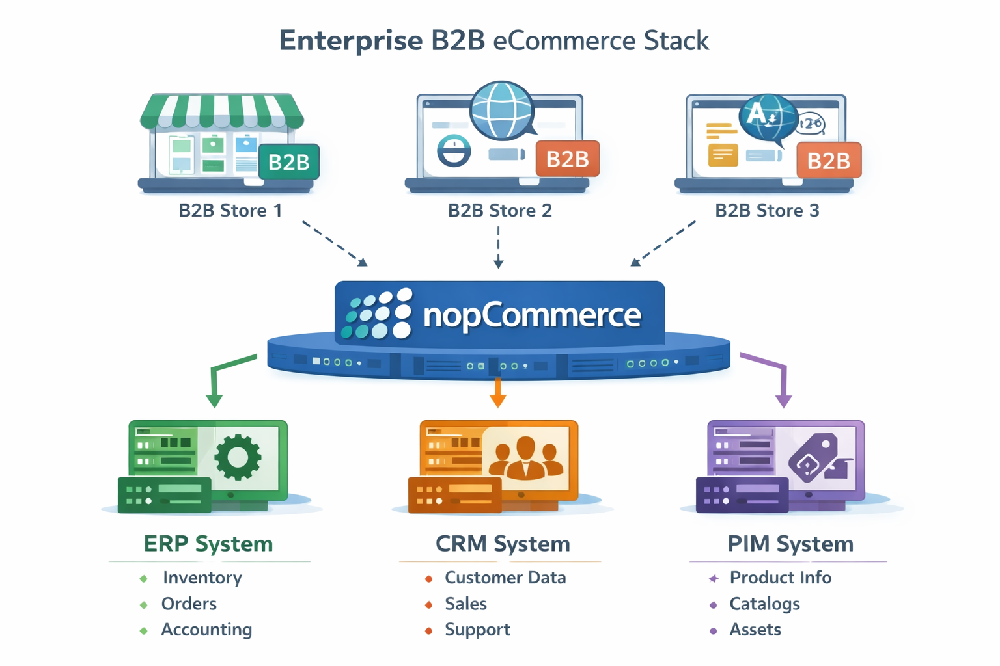
What makes a B2B eCommerce platform “enterprise-ready”?
“Enterprise-ready” in B2B usually means the platform can handle complex buying rules, large catalogs, multiple customer hierarchies, and integration-heavy operations—without becoming fragile when traffic, SKUs, or teams scale. For most organizations, the biggest requirements are:
- Governance: granular roles, permissions, and audit-friendly administration.
- Segmentation: different prices, catalogs, and checkout rules per customer group.
- Integrations: reliable sync with ERP/CRM/PIM, inventory, pricing, and fulfillment.
- Scalability: performance strategy (caching, CDN, hosting) and operational monitoring.
- Security: least-privilege access, safe customizations, and controlled data exposure.
Which nopCommerce features matter most for B2B?
1) Role-based access control (RBAC) and permission governance
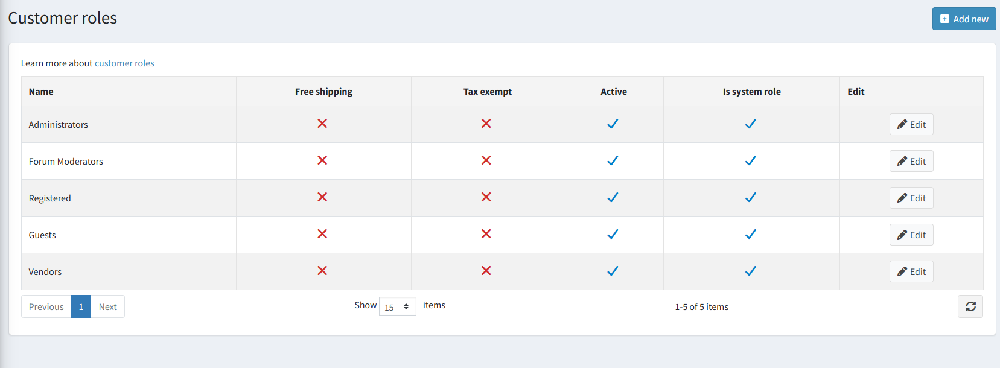
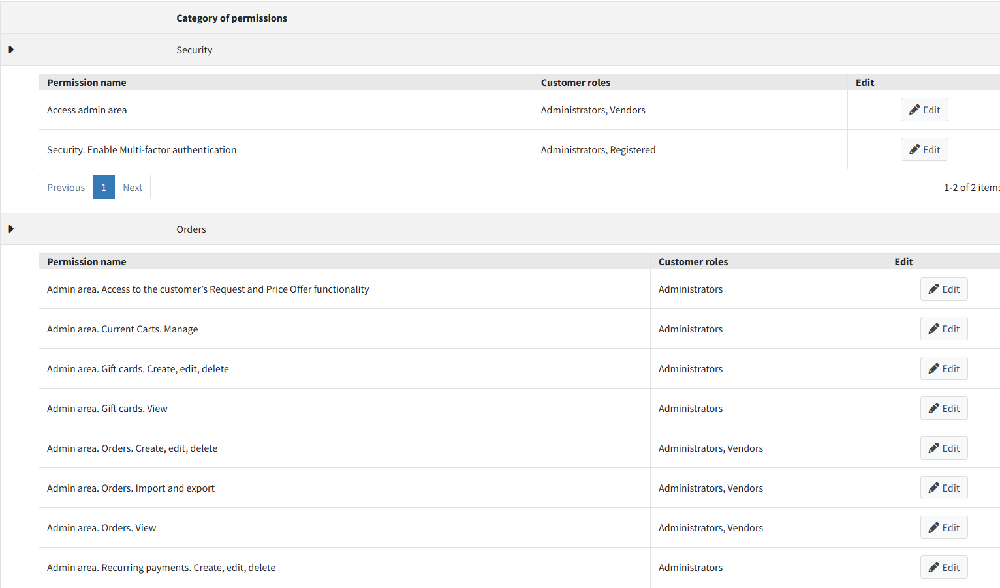
In B2B, you rarely have “one buyer = one user.” You have procurement roles, finance approvers, store admins, and customer service teams. nopCommerce supports customer roles and access control lists (ACL) so you can limit what different roles can access in the admin area and in storefront features.
- Define customer roles (e.g., “Wholesale Buyer”, “Distributor”, “Account Manager”).
- Apply permissions to restrict admin capabilities and sensitive operations.
- Use least-privilege rules: only grant what’s needed for each role.
2) Segmented catalogs and pricing for wholesale logic
Wholesale and enterprise B2B almost always require different prices per customer group, plus volume-based discounts. A practical pattern is:
- Assign customers to roles (e.g., Bronze/Silver/Gold, Distributor, Key Accounts).
- Apply tier pricing, discounts, and catalog visibility rules based on those roles.
- Keep “pricing truth” in ERP when needed, and sync into nopCommerce on a schedule or via events.
This approach helps you support negotiated pricing and bulk purchasing while keeping control of margin rules. (If you need quoting workflows, you can add a custom module or plugin-based flow depending on your process.)
3) Multi-store operations from a single installation
Many enterprise B2B programs need multiple storefronts: separate brands, regions, languages, or business lines. nopCommerce supports running more than one store from a single installation and admin interface, which can reduce operational overhead while allowing store-level configuration.
- Host different storefronts on different domains.
- Share catalog data across stores when it makes sense.
- Allow customers to use the same credentials across stores (useful for multi-brand groups).
4) Integration readiness (ERP/CRM/PIM) via APIs + predictable architecture
B2B eCommerce becomes “enterprise-grade” when it’s integrated: inventory, customer accounts, negotiated prices, shipping rules, invoices, and returns. The key is not only “having an API,” but implementing a reliable integration pattern:
- System of record: decide what owns products, pricing, and stock (often ERP/PIM).
- Sync strategy: batch jobs for catalog + near-real-time events for orders and status changes.
- Data quality: normalized SKUs, units, tax rules, and customer identifiers.
- Observability: logs, retry policies, and alerts for failed syncs.
If your organization needs SAP, Microsoft Dynamics, or other enterprise systems, the platform’s flexibility and .NET ecosystem make it feasible to implement a stable connector approach—with proper engineering discipline.
5) Security and compliance foundations
Enterprise B2B typically involves stricter data handling and internal audit requirements. You’ll want:
- Strong role governance (RBAC/ACL) for admin and operational users.
- Secure hosting, TLS, backups, and patch management.
- Controlled customizations (code reviews, dependency checks, staging releases).
6) Performance and scalability: caching, hosting, and operational discipline
B2B stores can be deceptively heavy: large catalogs, complex search, many price rules, and frequent integrations. Enterprise readiness means planning for performance from day one:
- Caching strategy: choose the right caching layers and invalidate safely.
- Hosting strategy: scalable infrastructure, database performance, and CDN for assets.
- Monitoring: uptime, page speed, error rates, and integration queue health.
nopCommerce publishes performance guidance, and the community has shared improvements around distributed caching approaches—useful if you scale beyond a single server.
Enterprise-ready B2B checklist for nopCommerce (feature-by-feature)
| Enterprise need | nopCommerce capability | Implementation notes |
|---|---|---|
| Governance (roles & permissions) | Customer roles + ACL permissions | Start with least privilege; map business roles to permissions. |
| Wholesale pricing (tier/volume, account pricing) | Tier pricing, discounts, role-based rules (implementation-dependent) | Define “source of truth” (ERP vs store) and sync consistently. |
| Multi-brand / multi-region | Multi-store from one installation | Good for shared catalog governance with localized experiences. |
| Integration-heavy ops | API + extension ecosystem | Use a queue/retry strategy; monitor sync and failures. |
| Performance at scale | Caching guidance + distributed cache options | Plan for CDN, DB tuning, caching, and load testing. |
| Operational stability | Upgradeable platform + structured deployment | Avoid “quick hacks”; keep upgrades and security patches routine. |
Implementation tips: what to configure first (to get B2B right)
- Map your customer model: Who buys? Who approves? Who sees pricing? Convert this into roles and permissions before you build UI.
- Define pricing ownership: If ERP owns pricing, implement a robust sync (and reconciliation rules). If the store owns pricing, standardize discount logic and approvals.
- Design multi-store intentionally: Only split stores when there’s a real operational reason (brand, region, catalog).
- Plan integrations early: Orders, customers, inventory, shipping, and taxes should not be “phase 2” surprises.
- Performance baseline: set KPIs (TTFB, LCP, error rate), implement caching/CDN/monitoring before launch.
If you want help planning architecture or scoping the build, explore our nopCommerce services or contact us for a technical discovery.
Common pitfalls (and how to avoid them)
- “We’ll add roles later.” In B2B, access and pricing rules are core logic—design them first.
- Hardcoding one-off pricing rules. You’ll lose control fast—use a structured pricing model and document it.
- Integrations without monitoring. Sync failures become “invisible revenue leaks.” Add logs, retries, and alerts.
- Performance treated as an afterthought. B2B catalogs + segmentation can get heavy—baseline early and load test.
Key takeaways
- nopCommerce supports enterprise B2B when governance (roles/ACL), segmentation, and integrations are designed upfront.
- Multi-store helps enterprise groups run multiple storefronts from one admin and codebase.
- Performance and stability come from caching, hosting, monitoring, and disciplined custom development.
- Most “enterprise readiness” wins are implementation decisions—not just feature checkboxes.
FAQ
Is nopCommerce suitable for B2B and wholesale?
Yes—nopCommerce can support B2B use cases like segmented customer roles, wholesale pricing logic, and enterprise operations, especially when you implement role-based governance and integrate with ERP/CRM/PIM systems. The best results come from designing your customer model, pricing ownership, and integration workflows early in the project.
How do you restrict catalogs and features per customer?
A common approach is to assign customers to roles and use access control (ACL) and configuration rules to control visibility and permissions. For example, “Distributor” can see a different set of products, pricing, or purchase rules than “Retail.” This keeps sensitive pricing and product access aligned with your agreements.
Can nopCommerce run multiple storefronts for different brands or regions?
Yes. nopCommerce supports multi-store setups where you manage multiple storefronts (often on different domains) from a single installation and admin interface. This is useful for enterprise groups that want shared governance but localized storefront experiences.
What integrations are typical for enterprise B2B?
The most common integrations are ERP (pricing, inventory, invoicing), CRM (accounts and sales workflows), and PIM (catalog and product data). Operationally, you’ll also want shipping, tax, payments, and analytics. The key is implementing a reliable sync pattern with monitoring, retries, and clear “system of record” ownership.
How do you keep nopCommerce fast at enterprise scale?
Start with the right hosting and database sizing, then add a caching strategy, CDN for assets, and monitoring. Avoid heavy custom logic in the critical request path, and load test before peak seasons. If you scale beyond one server, consider distributed caching patterns and a deployment process that supports frequent safe updates.